


Manga AI - AI Comic Generator
4.0174.00 Reviews
App Specs
- Version
- 2.1.4
- Updated On
- License
- Free
- Downloads
- 100,000+
- Developer
- Video & Music AI - Create Video & Make Songs
- Categories
- Comics
- Platform
- Android
Screenshots
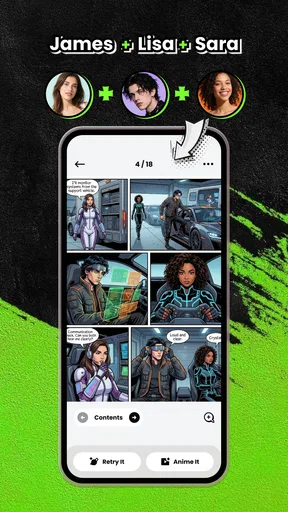
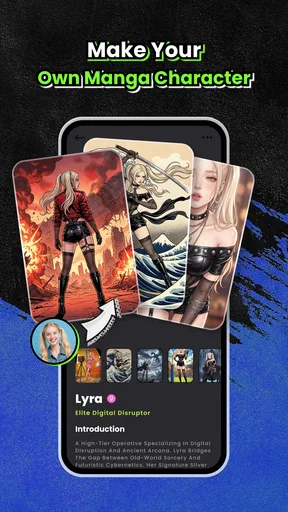
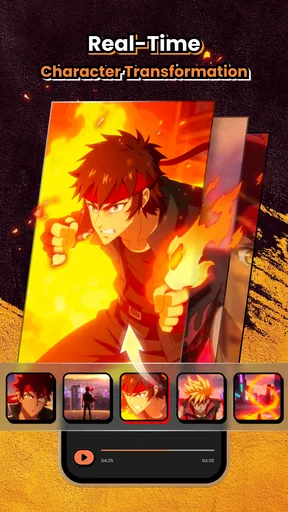
 Analysis by AppCompare
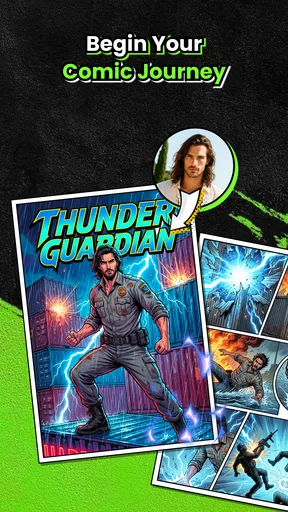
Have you ever wanted to create your own manga but felt overwhelmed by the artistic demands? Well, let me introduce you to Manga AI - AI Comic Generator. This app is a game-changer for anyone who has a story to tell but lacks the drawing skills to bring it to life.
What I would want from an AI comic tool
My main test for a manga-making app is not whether it can produce a striking image once; it is whether it helps me turn an idea into a sequence that makes sense. A comic needs more than attractive character art. The reader has to understand who is speaking, where the scene is happening, and how one moment leads into the next. That distinction matters when deciding whether to use an AI generator as a sketching partner or expect it to replace the full process of making a comic.
I would approach this app with a small, manageable scene rather than a sprawling saga. A short exchange between two characters gives you a chance to see whether the visual direction suits the mood before you invest time shaping a much longer story. If the result feels off, you can revise the idea while the stakes are low. That is a more useful first experiment than asking any generator to illustrate a whole novel in one go.
Unleashing Your Inner Mangaka
First things first, Manga AI - AI Comic Generator is designed to make manga creation accessible to everyone. It uses advanced AI technology to generate manga-style artwork based on your inputs. You don't need to be a professional artist; the app does the heavy lifting for you. How cool is that?
User-Friendly Interface
The app's interface is sleek and intuitive. Even if you're not tech-savvy, you'll find it easy to navigate. When you open the app, you're greeted with a clean layout that guides you through the comic creation process. Everything is laid out in a step-by-step manner, so you won't feel lost.
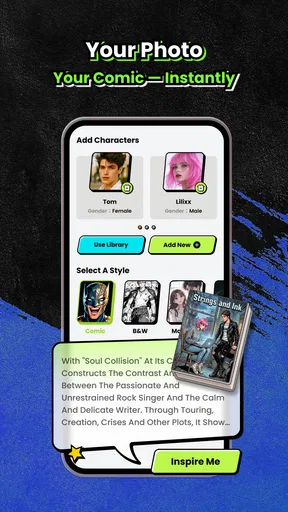
Starting a new project is as simple as pie. You just type in your story ideas, and the AI suggests visual elements to match. Whether you’re crafting a fantasy epic or a slice-of-life tale, the app tailors its suggestions to fit your narrative.
Building a scene you can actually use
For a practical trial, I would write one beat at a time: first establish the location, then describe what the character is doing, and only then add the emotional tone. That order gives the generator clearer ingredients to work with than a paragraph packed with backstory, camera directions, and several actions at once. If a panel does not communicate the scene, I would simplify the prompt before adding more descriptive flourishes.
Worth Reading Before You Choose

EA SPORTS FC Mobile 26 Is a Bigger Football Game, but It Takes Time

Flipboard Shows What News Apps Must Do Beyond the Feed

Switching to Android Auto Means Rethinking Your Driving Routine

Google Calendar Makes a Crowded Week Easier to Manage

Ludo King Makes the Most of the Minutes Between Plans

Baby Panda World Brings Quick Play to Modern Phones, but Its Game Library Feels Busy
A useful habit is to keep a small character note outside the prompt: the character’s name, defining appearance, clothing, and the traits that should remain recognizable. Reusing concise descriptions can help keep a project’s visual direction more intentional. It is not a guarantee that every image will match perfectly, so I would treat the output as a sequence of drafts and inspect each panel rather than assuming continuity has been solved automatically.
AI-Powered Creativity
Now, here's where the magic happens. The AI analyzes your text and generates artwork that resonates with your story. You can customize characters, settings, and even the color palette to suit your vision. It's like having a personal artist at your fingertips!
One of the standout features is the character creator. You can tweak every detail, from hairstyles to outfit designs, ensuring your characters are just how you imagined them. And if you’re feeling adventurous, the app's randomizer can surprise you with unique character designs.
Where the trade-off shows
The creative shortcut is also the main compromise: generated art gives you a starting point, but it does not remove the need for an author’s eye. A panel can look appealing yet fail to show the precise gesture or expression your scene requires. I would be ready to adjust the wording, try a different visual direction, or leave out a flourish that distracts from the story. Anyone who needs exact control over anatomy, lettering, composition, or continuity may be happier drawing by hand or using a conventional comic editor.
There is also a difference between making a picture and finishing a readable page. Before sharing a comic, I would check the order of events, make sure speech is easy to follow, and look for visual changes that could make a character seem like someone else between panels. AI-assisted creation can reduce the barrier to getting images on the page, but the writer still has to make the page communicate clearly.
A good fit for quick creative routines
This kind of workflow suits people who already have a scene in mind but do not want a blank canvas to stop them. For example, if I had a spare half-hour after work, I could turn a funny exchange from the day into a short comic concept, test a couple of character looks, and save the strongest direction for later. That is a more realistic use than expecting to complete a polished series in one sitting.
It may also help a writer pitch a visual idea to a friend or use images as storyboarding references. In those cases, the goal is to communicate tone and character, not to produce a publication-ready page. By contrast, an experienced illustrator who wants precise layer control, careful lettering, and repeatable panel composition should consider a dedicated drawing or layout tool instead. The right choice depends on whether speed and idea exploration matter more than hands-on control.
Collaborate and Share
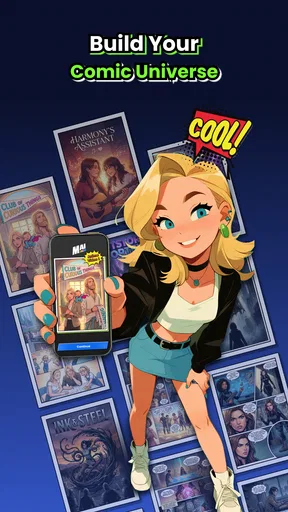
Another thing I love about this app is its collaboration feature. You can invite friends to join your project, making it a perfect tool for team-based storytelling. Whether you're working together on character designs or storyboarding, the app supports seamless collaboration.
Once your masterpiece is complete, sharing it is a breeze. The app offers multiple export options, so you can easily share your work on social media or publish it on your favorite platforms. Plus, the high-resolution export ensures your art looks stunning, no matter where it’s viewed.
Planning a shared project
When collaborating, I would agree on the story’s basic visual direction before inviting others to build on it: who the central characters are, what the scene is trying to say, and which details should stay consistent. That small planning step can prevent a shared project from turning into a collection of attractive but unrelated panels. It also gives everyone a clearer standard for deciding which drafts are worth keeping.
Sharing is most useful when the audience knows what they are looking at. I would put a short setup before a comic excerpt, especially if it is a work in progress, and ask readers a focused question about the scene rather than a vague request for feedback. If the work is intended for a particular platform, I would check how the exported page reads on a phone before posting; a page that looks fine on a larger screen can feel crowded when viewed small.
Endless Possibilities
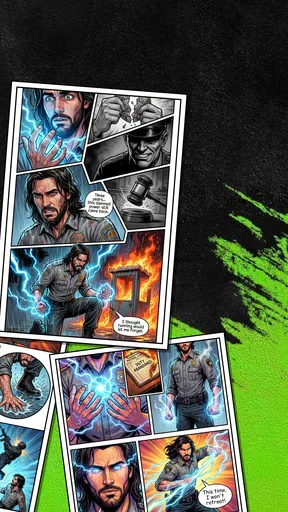
The possibilities with Manga AI - AI Comic Generator are endless. Whether you’re crafting a short comic strip or a full-length manga, the app provides the tools you need to bring your stories to life. It even supports different panel layouts, so you can experiment with traditional manga styles or create something entirely new.
"Creating manga has never been this accessible or fun!"
With regular updates and a responsive development team, the app is continually improving. They’re always adding new features and refining existing ones based on user feedback. This commitment to improvement ensures that the app stays relevant and user-friendly.
How it compares with other ways to make comics
Compared with drawing every panel yourself, AI generation can make it easier to explore a visual idea when drawing is not your strength. Compared with a general-purpose image generator, a comic-focused workflow is more directly aimed at turning story concepts into manga-style scenes. But if your priority is total control over page geometry, precise typography, or meticulous redrawing, a traditional art app still offers the more dependable toolkit. I see this as a way to get from idea to visual draft, not a universal replacement for illustration software.
It is also worth separating experimentation from finished publishing. For a personal concept, a playful short piece, or an early pitch, imperfect consistency may be acceptable and even useful. For a long-running story where readers expect the same character to look unmistakably alike in every scene, I would plan to review and refine the output carefully. The more continuity your story depends on, the more time you should allow for editing around the generated images.
Practical questions before you start
The app is free to download, while in-app purchases range from $4.99 to $79.99 per item. I would begin with a small project before paying for anything: first see whether the visual results fit your taste, then decide whether extra purchases make sense for the way you work. That keeps the decision tied to your own use rather than the excitement of a first generated image.
It is rated for Everyone, and the current version is 2.0.7, with a minimum operating system requirement of 8.1. Those details make it easier to judge whether it is a practical option for your device and household. The app is in the Comics category and is made by Video & Music AI - Create Video & Make Songs; it has an average rating of 4.4 from around 5.5K ratings, with 120 written reviews and over 100K installs. I would treat that popularity as context, not a promise that every person will get the same results.
If you are wondering whether you need to know how to draw, the answer is no: the appeal is precisely that you can start from a written idea. If you are wondering whether that means you can skip art direction, I would say no again. You still need to decide what belongs in a scene, check that the images support the story, and choose what to revise. That balance is what makes the app approachable without making comic-making entirely automatic.
Final Thoughts
In a nutshell, Manga AI - AI Comic Generator is a must-have for aspiring mangakas. It combines the power of AI with user-friendly design, making manga creation enjoyable and accessible. Whether you’re a seasoned writer or just starting out, this app empowers you to tell your stories in vibrant, manga-inspired visuals. So, why not give it a try and unleash your creativity?
Ready to dive into the world of manga creation? Download the app today and start your journey as a digital mangaka. Trust me, you won't regret it!
My verdict
I would recommend it most to curious storytellers, manga fans with ideas but limited drawing experience, and friends who want to build a visual draft together. I would not choose it as my only tool if my work depended on exact panel-by-panel control or unwavering character continuity. The best way to judge it is to make one small scene, inspect the result with a critical eye, and decide whether its particular balance of AI assistance and personal editing suits you.
Pros
- Generates unique comic-style art quickly.
- User-friendly interface for easy navigation.
- Includes a variety of art styles to choose from.
- Regular updates with new features and styles.
- No prior art skills required to create comics.
Cons
- Limited customization options for characters.
- Requires internet connection for AI processing.
- Some styles may lack detailed refinement.
- In-app purchases needed for premium features.
- Occasional lag on older devices.
FAQs for Manga AI - AI Comic Generator
What is Manga AI - AI Comic Generator?
Manga AI - AI Comic Generator is a cutting-edge application that allows users to create their own manga or comic strips using artificial intelligence. It offers a variety of templates, characters, and scenes that can be customized to suit your storytelling needs. The app is available for both Android and iOS devices.
How user-friendly is the Manga AI app?
Manga AI is designed with user-friendliness in mind, featuring an intuitive interface that allows even beginners to easily navigate through its features. The app offers tutorials and step-by-step guidance, making it accessible for users of all skill levels who are interested in creating comics or manga.
Does Manga AI offer customization options?
Yes, Manga AI provides extensive customization options. Users can select from a wide array of characters, backgrounds, and props. The AI-powered tools also allow users to modify facial expressions, poses, and dialogue, enabling the creation of unique and personalized comic strips effortlessly.
Is an internet connection required to use Manga AI?
An internet connection is necessary for initial setup and to access some of the app’s advanced features, such as cloud storage and updates. However, once you've downloaded your desired templates and assets, you can work offline, making it convenient for users on the go.
Are there any in-app purchases in Manga AI?
Manga AI offers a range of free features, but it also includes in-app purchases for premium content. These may include additional character packs, exclusive templates, and advanced editing tools. Users can choose to make these purchases to enhance their comic creation experience.


